


Reaction
Tasks
The Reaction Task asks participants to choose a reaction from a list you configure. It is a quick and visual way to capture how participants feel about a prompt, experience, idea, or moment. Use Reaction Tasks for mood checks, instant feedback, icebreakers, opinion polls, or quick reflections. They work especially well when you want a lightweight response that feels more expressive than a standard multiple choice question.
How to Create Rating Tasks
Step 1: Use the Web App on desktop for the best experience.
Step 2: Click on the "Create Event" button to begin
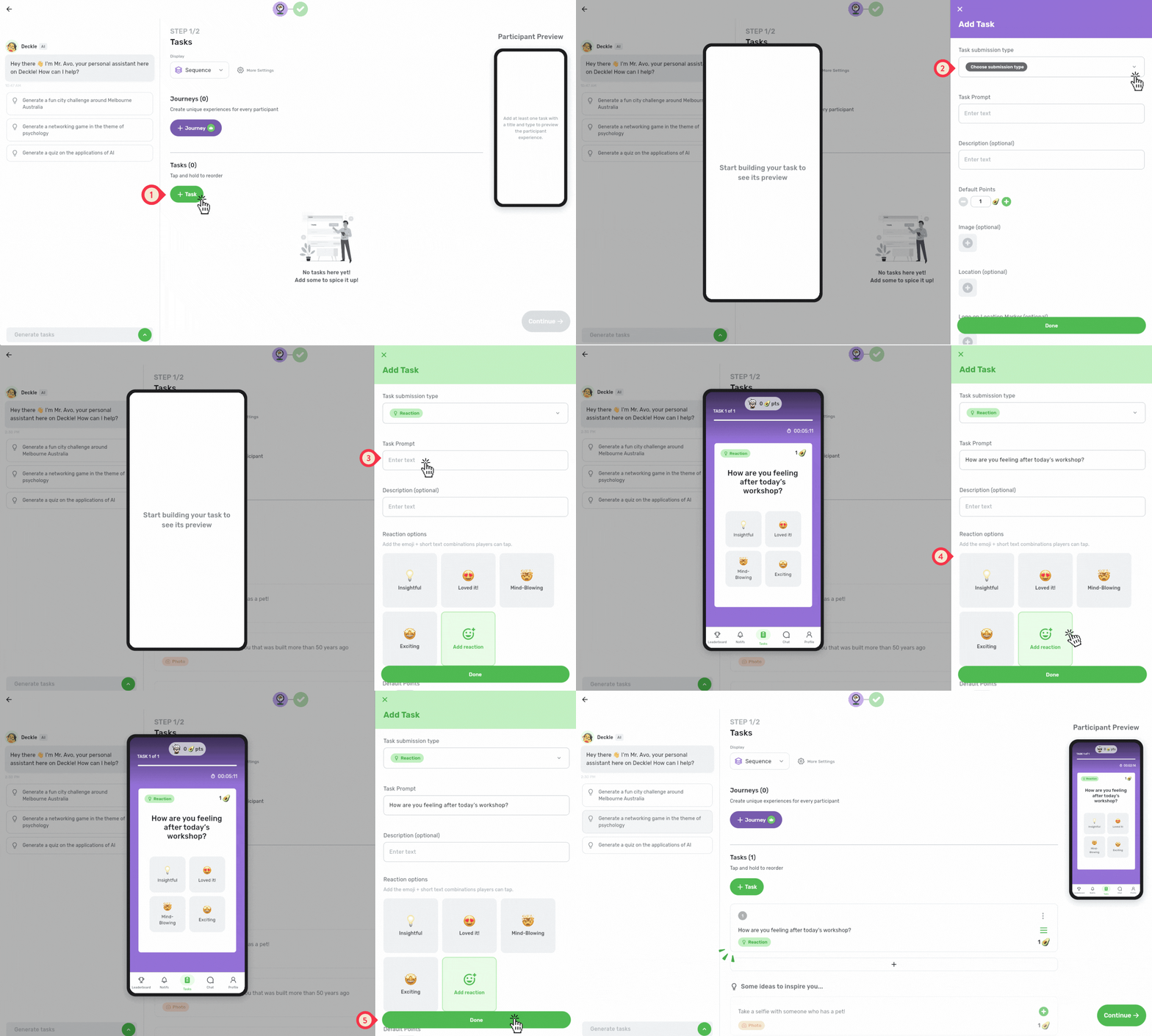
Step 3: Enter the Manage Tasks page.
Click + Task to begin.
Choose Reaction as the task submission type.
In the Task Prompt, add a title to your task (e.g., “How are you feeling after today’s workshop?” or “How has your first week been so far?”).
Add more Reaction options (emojis and text) or edit the default options according to your liking!
Click "Done" to save and add the task to your event!
Examples to inspire you!
🎤 React to the Session
Prompt: How are you feeling after today’s workshop?
Example reactions:
🤩 Loved it
👍 Feeling good
🤔 Still thinking
😵 A lot to take in
🙋 I have questions
Ideas to try:
Use reactions for a quick pulse check at the end of a session
Keep the options short so participants can respond in seconds
🎓 First Week Check-In
Prompt: How has your first week been so far?
Example reactions:
😄 Loving it
🙂 Settling in
😅 A bit overwhelmed
🤝 Met some great people
🧭 Still finding my way
Ideas to try:
Use this during orientation or onboarding
Choose reactions that reflect the range of experiences you expect
💡 React to an Idea
Prompt: What’s your first reaction to this proposal?
Example reactions:
🚀 Let’s do it
👍 Sounds promising
🤔 Need more info
🛠️ Needs some work
👎 Not convinced
Ideas to try:
Use it during workshops, planning sessions, or team meetings
Add an image or context in the task description before participants react
